
DevOps Leveling: Conquering HNG Internship Stage 2 — FastAPI, Docker, and CI/CD
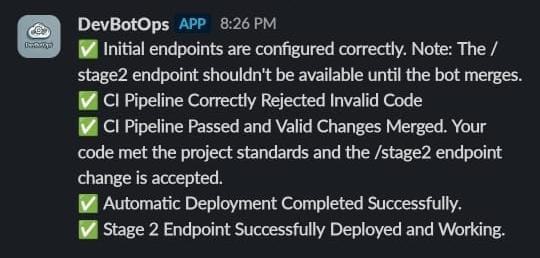
Having successfully navigated the world of web servers in Stage 0 and built a functional API in Stage 1, I was ready for the next challenge in the HNG Internship: Stage 2. This stage focused on automating the deployment process using Continuous Integration and Continuous Deployment (CI/CD) pipelines, containerizing our application with Docker, and serving it through Nginx. This was a significant step up in complexity and a rewarding opportunity to level up my DevOps skills.
The Task at Hand: Automating Deployment
In Stage 2, we were tasked with taking an existing FastAPI application, adding a missing API endpoint, and setting up a complete CI/CD pipeline. The pipeline should automatically run tests on pull requests and deploy the application to a public endpoint whenever changes are merged into the main branch. We also had to containerize the application with Docker and serve it using Nginx as a reverse proxy.
Technology Stack
* Programming Language: Python
* Programming Stack: Fast API, Docker, GitHub Actions
* AWS Linux server
Setting Up The Stage
Step 1: Clone the Repository
The first step is to fork the repo and clone the repository to your local devicegit clone https://github.com/hng12-devbotops/fastapi-book-project.gitcd fastapi-book-project/
Step 2: Setting Up a Virtual Environment
I am testing the application locally before deploying, using a virtual environment is the best practice to manage your Python dependencies. To do this you need to create and activate a virtual environment.python3 -m venv hngsource hng/bin/activate
- install the required dependency using this command
pip install -r requirements.txt
Step 3: Implementing the Missing Endpoint
Our API is currently unable to fetch a single book using its ID. In this step, I added a new endpoint to the FastAPI router that handles a GET request to retrieve a book based on its provided ID.
Add this code to the books.pyfile
@router.get("/{book_id}", response_model=Book, status_code=status.HTTP_200_OK)  # New endpoint
async def get_book(book_id: int):
    book = db.books.get(book_id)
    if not book:
        raise HTTPException(
            status_code=status.HTTP_404_NOT_FOUND,
            detail="Book not found"
        )
    return book
- Ensure to import HTTPException from fastapi
Step 4: Testing the Endpoint
Once you’ve implemented the endpoint, it’s important to test it to ensure it behaves as expected, I did this by running this commandpytest
- I then started the FastAPI application using Uvicorn
uvicorn main:app --reload
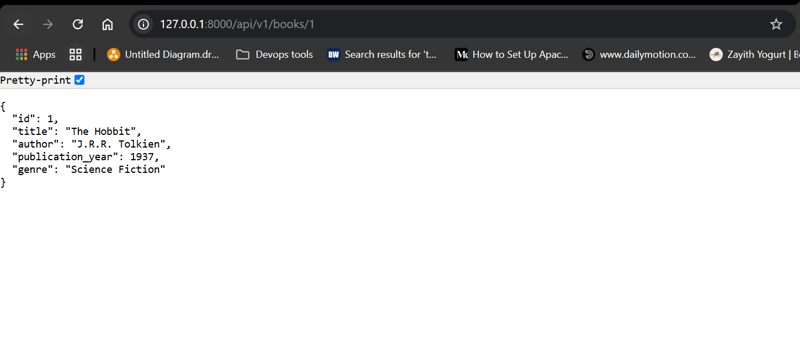
The application is running fine on localhost
Step 5: Dockerizing Our Application
Create a Dockerfile in the project directory
# Use an official lightweight Python image
FROM python:3.9-slim
# Set work directory
WORKDIR /app# Install dependencies
COPY requirements.txt .
RUN pip install --upgrade pip
RUN pip install -r requirements.txt# Copy project files
COPY . .# Expose the port FastAPI runs on
EXPOSE 8000# Run the FastAPI application using Uvicorn
CMD ["uvicorn", "main:app", "--host", "0.0.0.0", "--port", "8000"]
Step 6: Integrating Nginx as a Reverse Proxy
To make things easier for me, I used a docker-compose.yml file to configure Nginx as a reverse proxy. To do this I created a nginx.conf file with the configurations for my application. The purpose of this configuration is to have Nginx listen on port 80 and forward incoming HTTP requests to the FastAPI application running on port 8000 inside its container.
nginx.conf
server {
    listen 80;
    server_name your_domain_or_IP;
    location / {
        proxy_pass http://app:8000;
        proxy_set_header Host $host;
        proxy_set_header X-Real-IP $remote_addr;
        proxy_set_header X-Forwarded-For
        $proxy_add_x_forwarded_for;
        proxy_set_header X-Forwarded-Proto $scheme;
    }
}
- listen 80: Nginx listens for incoming HTTP requests on port 80.
- server_name: Replace with your domain or IP address.
- proxy_pass: Directs traffic to the service named app (defined in the docker-compose file) on port 8000.
docker-compose.yml
version: '3.8'
services:
  app:
    build: .
    container_name: fastapi-app
    ports:
      - "8000:8000"
  nginx:
    image: nginx:latest
    container_name: fastapi-nginx
    volumes:
      - ./nginx.conf:/etc/nginx/conf.d/default.conf
    ports:
      - "80:80"
    depends_on:
      - app
- The app service builds and runs our FastAPI application.
- The Nginx service uses an Nginx image, mounts the custom configuration file, and maps port 80 of the container to port 80 on the host.
- The depends_on command ensures that the FastAPI container starts before Nginx.
- Then I used this command to build the containers
docker-compose up --build


- As you can see, our containers are up and running and Nginx is successfully routing incoming traffic to our FastAPI application.
Step 7: Create a Linux Server
For hosting and deploying our FastAPI application, I set up a Linux server on AWS. This server serves as the backbone of our deployment environment, where our Dockerized application will run and be accessible to users.
Step 8: Set Up the CI Pipeline
I created a GitHub Actions Workflow File for this step to automatically run tests on every pull request targeting the main branch. This ensures that any new changes are validated before they can be merged.mkdir -p .github/workflows/cd .github/workflows/touch ci.yml
name: ci pipeline
on:
  pull_request:
    branches: [ main ]jobs:
  test:
    runs-on: ubuntu-latest
    steps:
    - uses: actions/checkout@v2
    - name: Set up Python
      uses: actions/setup-python@v2
      with:
        python-version: '3.9'
    - name: Install dependencies
      run: |
        python -m pip install --upgrade pip
        pip install -r requirements.txt
    - name: Run tests
      run: pytest
- push your changes to GitHub and check the status of your pipeline
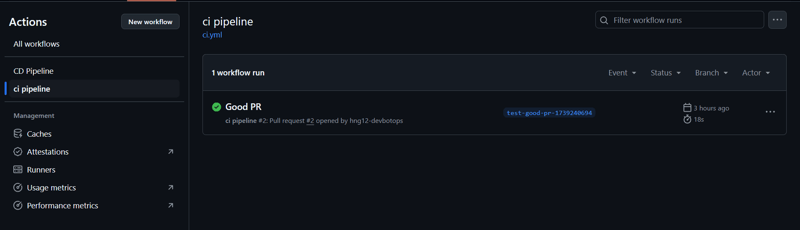
Step 9: Set Up the Deployment Pipeline
For continuous deployment, I created another GitHub Actions Workflow File named deploy.yml. This deployment pipeline is triggered whenever changes are pushed to the main branch, automating the process of updating the live application.touch deploy.yml
name: CD Pipeline
on:
  push:
    branches: [main]
jobs:
  deploy:
    runs-on: ubuntu-latest
    steps:
      - name: Checkout repository
        uses: actions/checkout@v3
      - name: Deploy via SSH
        uses: appleboy/ssh-action@master
        with:
          host: ${{ secrets.SSH_HOST }}
          username: ${{ secrets.SSH_USERNAME }}
          key: ${{ secrets.SSH_PRIVATE_KEY }}
          script: |
            # Update package index and install dependencies
            sudo apt-get update -y
            sudo apt-get install -y apt-transport-https ca-certificates curl software-properties-common            # Add Docker's official GPG key
            curl -fsSL https://download.docker.com/linux/ubuntu/gpg | sudo apt-key add -
            sudo add-apt-repository "deb [arch=amd64] https://download.docker.com/linux/ubuntu $(lsb_release -cs) stable"            # Install Docker
            sudo apt-get update -y
            sudo apt-get install -y docker-ce docker-ce-cli containerd.io            # Add the SSH user to the Docker group
            sudo usermod -aG docker ${{ secrets.SSH_USERNAME }}            # Install Docker Compose
            sudo curl -L "https://github.com/docker/compose/releases/download/v2.20.2/docker-compose-$(uname -s)-$(uname -m)" -o /usr/local/bin/docker-compose
            sudo chmod +x /usr/local/bin/docker-compose            # Verify installations
            docker --version
            docker-compose --version            # Navigate to the project directory and deploy
            cd /home/ubuntu/
            git clone <your-github-repo>
            cd fastapi-book-project/
            git fetch origin main
            git reset --hard origin/main
            docker-compose up -d --build
- Ensure your secrets are stored: Make sure
SSH_HOST,SSH_USERNAME, andSSH_PRIVATE_KEYare added to your GitHub repository’s secrets. - Push your changes to GitHub and check the status of your pipeline.
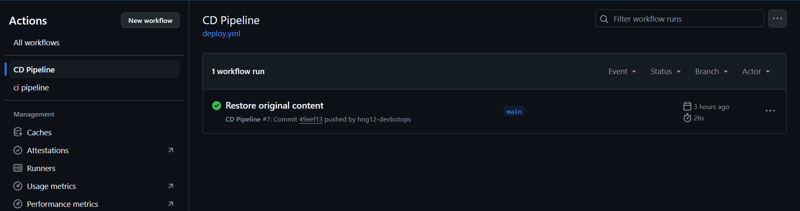
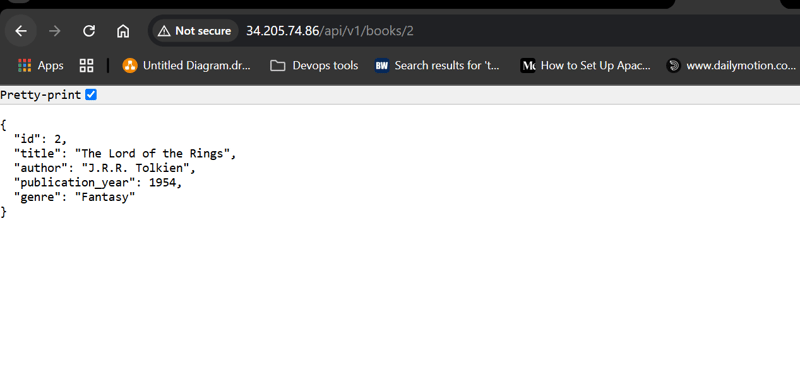
- Post-Deployment Verification: Once the pipeline completes, verify that your application is running as expected.
Step 10: Repository Access Requirement
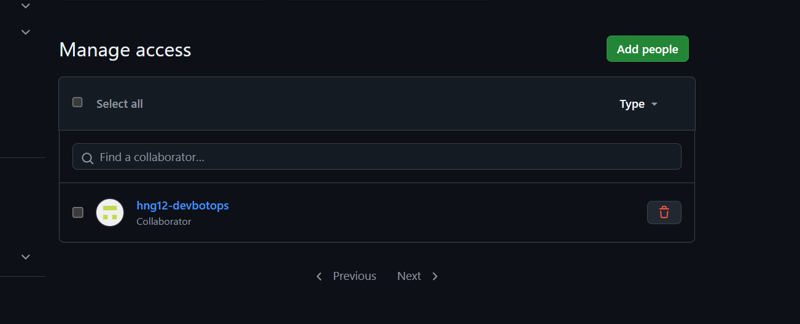
Before submission, we are supposed to invite the hng12-devbotops to our GitHub account as a collaborator in our repository. To do this;
- Open the repository if you want to add a collaborator
- Click on the Settings tab, which is usually located on the right side of the repository menu.
- In the left sidebar, under access, select Collaborators.
- Click on add people, add
hng12-devbotops
Challenges and Solutions
I encountered several challenges throughout this process. One of the main difficulties was properly setting up the secrets and variables on the Heroku portal, as the steps were difficult to troubleshoot, also Heroku was unable to perform the tasks as expected. I also spent a bit of time debugging the Heroku deployment issues, as the codes were working on my local host, this was mostly related to a permission error.
It may be due to changes and configurations in the environment, and there may not be a single clear course to take to resolve. This required a lot of testing as indicated, but I am happy to have completed the task
Git and Version Control: My understanding of Git for code management and collaboration was greatly improved.
Deployment to Cloud Platforms: I gained practical experience in deploying applications to cloud platforms like AWS and Heroku.
Lessons Learned — Key Takeaways
Stage 2 of the HNG Internship proved to be a treasure trove of invaluable lessons:
API Development Fundamentals: I gained hands-on experience in the full lifecycle of API development, including designing, building, and deploying RESTful APIs.
Error Handling and Input Validation: I learned how to implement robust error handling and input validation, which are crucial for creating reliable APIs.
Working with External APIs: I had the opportunity to interact with external APIs using the requests library.
Git and Version Control: My understanding of Git for code management and collaboration was greatly improved.
Deployment to Cloud Platforms: I gained practical experience in deploying applications to cloud platforms like Heroku.
Onwards to Stage 3
Now, I’m eagerly anticipating the challenges of Stage 3. Stage 2 has provided me with a rock-solid foundation in API development and deployment, and I’m excited to build upon this knowledge as I dive into containers and orchestration. Thank you, HNG Internship, for this amazing opportunity!
Conclusion
HNG Stage 2 has been an invaluable experience. It has solidified my grasp of key DevOps concepts and provided me with the opportunity to put my skills to the test in a real-world scenario. Armed with this knowledge and hands-on experience, I’m ready to confidently tackle the challenges of Stage 3 and continue my journey toward becoming a successful DevOps engineer.
Hi, this is a comment.
To get started with moderating, editing, and deleting comments, please visit the Comments screen in the dashboard.
Commenter avatars come from Gravatar.
Comments are closed.